
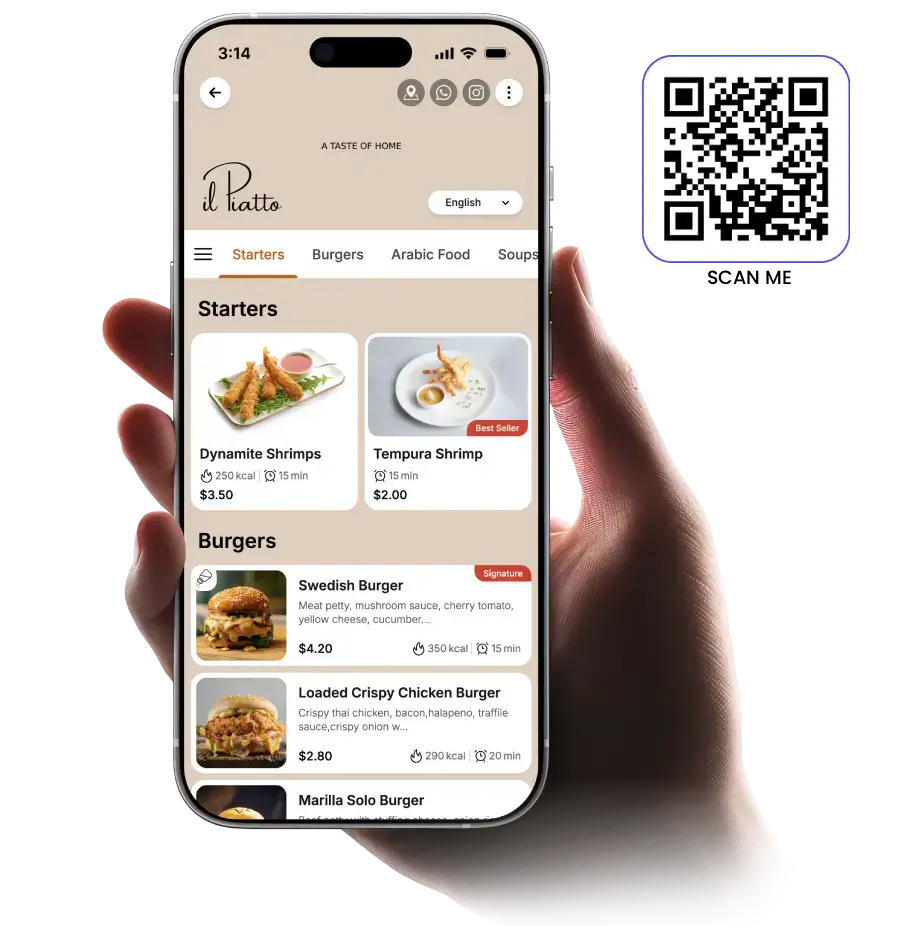
HIGH-SPEED RESTAURANT OS โ€ข 0% COMMISSION QR ORDERING

Turn Every Table Into a Fast Ordering & Billing Machine

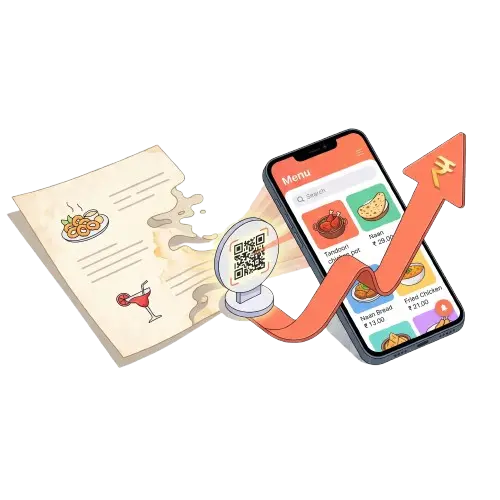
Replace slow paper menus and waiter bottlenecks with high-speed QR ordering. Your dining guests scan the table QR, order in 30 seconds, and pay via direct UPI โ€” while kitchen tickets print automatically to your thermal printers.

0% Commission: 100% of guest payments land directly in your merchant bank account
Turn Tables 25 Min Faster: Guests order & pay on their own schedule without waiter delay
2 Printers Supported: 1 in kitchen for auto-print KOTs + 1 at counter for customer bills
โ‚น0 Hardware Cost (Runs on any phone)
Sub-Second Page Load (<0.4s)
Instant Dish Updates in 2 Seconds
MenuQRO Table QR Ordering - Paper Menu to Digital Ordering Machine
LIVE RESTAURANT SANDBOX

Experience MenuQRO as a Dining Customer at "Aura Gourmet"

No app download or account needed. Browse appetizing dish photos, customize orders, add to cart, and see how fast and simple table QR ordering feels for your dining guests.

Live Shift Ready Table #3 Active
โšก 0.4s Fast Load: Opens immediately on any smartphone camera
๐Ÿ–จ๏ธ 2 Printers: Kitchen gets live KOT + Counter prints bill receipt
๐Ÿ›Ž๏ธ Waiter Bell: 1-tap "Call Waiter" and "Need Water" alerts
๐Ÿ’ฐ 0% Direct UPI: Money settles straight into your merchant bank

How QR code ordering works

Everything you need to launch contactless table ordering in 4 simple steps.

Step 1 โ€ข Cloud Menu
Cafe manager configuring digital ordering menu on tablet
STEP 1

Create your digital ordering menu.

Upload your dishes with appetizing food photos, set prices, and organize categories in our simple cloud dashboard. Update dish prices or sold-out items in 2 seconds from your phone.

Step 2 โ€ข Table Standees
Print QR codes on wooden restaurant table stands
STEP 2

Generate and print your table QR codes.

Each QR code is uniquely mapped to one of your tables, counter pickup spots, or bar seats. Generate and print tabletop QR standees with your brand logo using our built-in Planning Mode.

Step 3 โ€ข Instant Order
Diner scanning QR code on phone to explore digital menu
STEP 3

Diners scan QR codes to open your menu in <0.4s.

Guests view clear dish photos, customize special cooking instructions (like "Extra Spicy" or "No Garlic"), and pay immediately via direct 0% UPI without waiting for busy waiters.

Step 4 โ€ข Kitchen KOT
Professional kitchen chef fulfilling live kitchen KOT orders
STEP 4

Orders print in kitchen and appear on your screen.

The kitchen order ticket (KOT) prints automatically in the kitchen while the live ticket appears on your kitchen screen with loud audio chimes and voice announcements.

Explore Our High-Speed Restaurant Suite

Engineered to turn tables 25 minutes faster, eliminate paper menu reprinting, and keep 100% of your earnings.

2 PRINTERS SUPPORTED

Dual Thermal Printer Auto-Routing

Connect 2 printers: 1 inside the kitchen for instant auto-print KOTs with modifier notes ("Less Spicy", "No Onion"), and 1 at the counter for customer bills and tax receipts with your restaurant GST details.

ZERO COMMISSION

Instant 0% Commission UPI Payments

Direct deep-linking to Google Pay, PhonePe, Paytm, and CRED. 100% of guest payments land immediately in your merchant bank account without intermediate gateway cuts or aggregator commission fees.

OPERATIONS

Turn Tables 25 Minutes Faster

Eliminate the 20-minute table wait bottleneck. Guests sit down, scan table QR, build their order, and settle their bill on their own schedule. Boost weekend peak capacity by turning tables faster.

KITCHEN SCREEN

Live Kitchen Screen with Voice Alerts

Orders fire straight from table scans to kitchen screens with color-coded prep timer tracking (Fresh / Running / Overdue) and hands-free voice readouts so chefs hear orders clearly.

REAL-TIME SYNC

Instant Out-of-Stock (86'd) Toggle

Run out of fresh paneer or a special dish during dinner rush? Toggle the item off with a single tap in your dashboard โ€” instantly graying it out across all table QR codes in seconds to avoid diner disappointment.

REVENUE MAXIMIZER

Smart Food Pairing & Add-ons

Automatically recommends garlic butter naan with gravies, cold beverages with pizzas, and dessert pairings when customers add dishes to their cart โ€” lifting average bill values naturally.

STAFF CALL BELL

Digital "Call Waiter" & "Need Water" Bell

Diners tap the waiter call button on their phone to request water, ask for service, or request cutlery โ€” instantly ringing your staff's phones with clear table number alerts.

GUEST RETENTION

Direct Customer Records & CRM

Capture verified guest contact records on bill settlement. Export your proprietary customer database anytime to track your top VIP regulars and reward repeat dining visits.

LOW COST

โ‚น0 Proprietary Hardware Cost

Runs smoothly on standard Android/iOS phones, kitchen tablets, laptops, and ESC/POS thermal receipt printers. No expensive โ‚น50,000 POS billing computer hardware required.

Transparent, Fair Pricing

No hidden fees. No per-order commissions. 100% of diner payments land directly in your bank account.

Express Counters, Cafes & Quick-Serve

Starter Plan

โ‚น6,999/year
โšก Just โ‚น19 / day (Less than a cup of tea!)
Or โ‚น799 / month billed monthly โ€ข โ‚น0 setup fee
(Ideal for cafes, bakeries, juice bars, takeaways & fast-food counters)

Fast contactless table ordering and counter billing with 0% commissions.

  • โœ“ 1 Staff Login Allowed (Cashier / Owner)
  • โœ“ Up to 15 Tables or Counter Order Tokens
  • โœ“ 1 Thermal Printer Supported (Receipt / Bill printing)
  • โœ“ 100% Direct UPI to Bank (0% Commission โ€” โ‚น0 cut)
  • โœ“ Clean Fast Menu (Loads in under 0.4 seconds)
  • โœ“ Instant Price & Sold-Out (86'd) Updates
  • โœ“ Printable Table QR Stand Generator (Planning Mode)
  • โœ“ Works on Any Existing Phone, Tablet, or Laptop
๐Ÿ‘‘ Multi-Outlet Chains & Franchises

Multi-Branch License โ€” โ‚น11,999 Main + โ‚น4,999 / Add-on Branch

Running 2+ outlets or expanding a franchise chain? Manage all branches from one master login, clone menus in 1 click, and get independent kitchen printer routing for every branch.

โœ“ 1-Click Menu Copy Across Branches โœ“ Independent Kitchen Printers per Branch โœ“ Consolidated Multi-Branch Sales Reports โœ“ Branch-Specific Dish Pricing & Stock
๐Ÿ’ฌ Talk to Founder (+91 8955932907)
Built for Daily Speed

Our Setup vs Others: The Real Difference

Replace chaotic manual operations and expensive billing computers with a high-speed system.

Other Way Waiter Delays

Customers waiting 15+ minutes just to get paper menus, order food, and pay bills.

MenuQRO Way Instant 30s Table Ordering

Customers scan, view photos, order in 30 seconds, and turn tables 25 minutes faster.

Other Way Commission Cuts

Aggregators taking 20%-30% of your margins on every customer order.

MenuQRO Way 0% Commission direct UPI

Receive direct UPI payments straight into your merchant bank account instantly with โ‚น0 cut.

Other Way Reprinting Costs

Spending โ‚น2,000โ€“โ‚น5,000 every time dish prices change or items go out of stock.

MenuQRO Way Instant 2-Sec Phone Updates

Instantly edit prices, add new items, and toggle sold-out dishes from your phone.

Other Way Bulky Hardware

Spending โ‚น30,000 to โ‚น50,000 on bulky billing computer hardware and cables.

MenuQRO Way โ‚น0 Hardware Costs

Runs on any existing phone, tablet, or laptop with 2 standard thermal printers.

Grow your restaurant business

Read our latest guides and explore MenuQRO in top culinary destinations across India.

Restaurant Portal

Enter credentials to access the restaurant portal.

๐Ÿณ

Mark Order as Ready?

Kitchen staff normally marks dishes as Ready when cooked. As floor staff/waiter, are you sure you want to advance Order to Ready state now?

โœฆ Zero Password Friction for Daily Staff

Staff & Kitchen Direct Links

Share these magic links or the QR code with your waiters and chefs for this restaurant. They can bookmark them on their phones or tablets to open live orders and KOT directly with no password required!

๐Ÿ‘จโ€๐Ÿณ Staff / Waiter Terminal Live Orders & Payments
๐Ÿณ Kitchen KOT Display Chef Terminal
๐Ÿ’ต Cashier / POS Billing Settlement & Invoices
๐Ÿ”‘ Manager Portal Full Controls
๐Ÿ“ฒ Instant Scan for Staff Phone
Point phone camera at this QR code to launch Waiter Terminal instantly without entering credentials.

SuperAdmin Master Home

Fast performance task doing and active subscription overview.

Active Pro Subscriptions

0

Free/Trial Accounts

0

Total MRR Expected

โ‚น0

Fleet Management & Clean Reset

Keep exactly 1 sample per business type (Fine Dining, QSR, Cafe, Bar, Cloud Kitchen) and erase extra test records.

Fast Subscription Actions

Restaurant Name Contact Plan Status Quick Action

Business & Restaurant Fleet Registry

Multi-tenant database shards, operational archetype modes, live KOT routing & Supabase Cloud state synchronization.

โ˜๏ธ
Supabase Multi-Tenant Fleet Cloud Engine LIVE REALTIME ACTIVE

All 5 operational models (Fine Dining, QSR, Cafe, Restro-Bar & Cloud Kitchen) sync directly to businesses & business_state tables.

Filter Mode:
๐Ÿ’ก Click any badge on a card to switch its operational mode instantly
๐Ÿ”„

Switch Business Operational Mode

Choose the operational archetype for this restaurant terminal. Menus, dining profiles, staff permissions & ordering flows adjust dynamically.

๐Ÿงฌ

Clone Restaurant Outlet & Catalog

๐Ÿ’ก What does "Clone" do? Cloning instantly copies this restaurant's entire dishes catalog, pricing, categories, tax rules, and operational mode into a new franchise outlet or second branch. You do not have to re-enter anything manually!

Change Plan Subscription

Manage the active subscription plan. Limits and features (TTS, Table Count, Orders) are enforced based on this setting.

๐Ÿ“Š Google Sheets & Apps Script Setup

Connect your MenuQRO forms, leads, and orders to Google Sheets in 2 minutes without complex Cloud Console OAuth.

โšก Quick 3-Step Setup:
  1. Open your Google Sheet (in your personal/work Google account) โ†’ Click Extensions > Apps Script.
  2. Delete existing code, paste the script below, and click Deploy > New deployment.
  3. Select Web app, set Who has access to Anyone, click Deploy, and copy your Web App URL.
Apps Script Code (Auto Creates Sheet Headers)
/**
 * MenuQRO - Official Google Apps Script Web App
 * Automatically captures leads, orders & inquiries into your Google Sheet.
 */

function doPost(e) {
  var lock = LockService.getScriptLock();
  try {
    lock.waitLock(30000);
    var ss = SpreadsheetApp.getActiveSpreadsheet();
    var sheet = ss.getActiveSheet();
    
    // Auto-create Header Row if sheet is empty
    if (sheet.getLastRow() === 0) {
      sheet.appendRow([
        "Timestamp",
        "Submission Type",
        "Restaurant / Business Name",
        "Owner / Customer Name",
        "Phone / Mobile",
        "Email",
        "City",
        "Table / Outlet Info",
        "Plan / Total Amount",
        "Notes / Ordered Items",
        "Submission / Order ID"
      ]);
      sheet.getRange(1, 1, 1, 11).setFontWeight("bold").setBackground("#f3f4f6");
      sheet.setFrozenRows(1);
    }
    
    var data = {};
    if (e && e.postData && e.postData.contents) {
      try { data = JSON.parse(e.postData.contents); } catch (err) { data = e.parameter || {}; }
    } else if (e && e.parameter) {
      data = e.parameter;
    }
    
    var timeStr = Utilities.formatDate(new Date(), Session.getScriptTimeZone() || "Asia/Kolkata", "yyyy-MM-dd HH:mm:ss");
    var subType = data.type || data.action || "Form Submission";
    var restName = data.restaurantName || data.name || data.businessName || "N/A";
    var contactName = data.contactName || data.ownerName || data.customerName || data.customer || "N/A";
    var phone = data.phone || data.mobile || data.contact || "N/A";
    var email = data.email || "N/A";
    var city = data.city || "N/A";
    var tables = data.tables || data.tableNo || data.table || "N/A";
    var planOrTotal = data.plan || (data.total ? ("โ‚น" + data.total) : "N/A");
    var notes = data.notes || data.message || data.itemsText || (Array.isArray(data.items) ? JSON.stringify(data.items) : "N/A");
    var id = data.id || data.leadId || data.orderId || ("rec_" + Date.now());
    
    sheet.appendRow([
      timeStr,
      subType,
      restName,
      contactName,
      "'" + phone,
      email,
      city,
      tables,
      planOrTotal,
      notes,
      id
    ]);
    
    return ContentService.createTextOutput(JSON.stringify({
      status: "success",
      message: "Row appended successfully",
      row: sheet.getLastRow(),
      id: id
    })).setMimeType(ContentService.MimeType.JSON);
    
  } catch (err) {
    return ContentService.createTextOutput(JSON.stringify({
      status: "error",
      message: err.toString()
    })).setMimeType(ContentService.MimeType.JSON);
  } finally {
    lock.releaseLock();
  }
}

function doGet(e) {
  try {
    var ss = SpreadsheetApp.getActiveSpreadsheet();
    var sheet = ss.getActiveSheet();
    var dataRange = sheet.getDataRange();
    var values = dataRange.getValues();
    if (values.length <= 1) {
      return ContentService.createTextOutput(JSON.stringify({ status: "success", count: 0, rows: [] }))
        .setMimeType(ContentService.MimeType.JSON);
    }
    var headers = values[0];
    var rows = [];
    for (var i = 1; i < values.length; i++) {
      var rowObj = {};
      for (var j = 0; j < headers.length; j++) { rowObj[headers[j]] = values[i][j]; }
      rows.push(rowObj);
    }
    return ContentService.createTextOutput(JSON.stringify({
      status: "success",
      count: rows.length,
      rows: rows
    })).setMimeType(ContentService.MimeType.JSON);
  } catch (err) {
    return ContentService.createTextOutput(JSON.stringify({ status: "error", message: err.toString() }))
      .setMimeType(ContentService.MimeType.JSON);
  }
}
๐Ÿ”’ Environment Variables Setup (Cloudflare / Server):

To protect your Google Sheet URL without exposing it in the browser, add it to your hosting Environment Variables:

GOOGLE_SHEET_WEBHOOK_URL="https://script.google.com/macros/s/AKfycb.../exec"
VITE_GOOGLE_SHEET_WEBHOOK_URL="https://script.google.com/macros/s/AKfycb.../exec"
๐Ÿ›๏ธ

Architect New Restaurant Terminal

Choose an operational archetype & plan. Curated menus, visual dish assets, staff roles & permissions configure automatically in seconds.

โšก Step 1: Select Business Operational Archetype Tap any model to load full curated catalog & staff permissions
๐Ÿ‘‘
Fine Dining
Heritage Bistro & Banquets
Pro (โ‚น1,299/mo | โ‚น33/day)
๐Ÿ”
QSR Counter
Smash Burgers & Tokens
Starter (โ‚น799/mo | โ‚น19/day)
โ˜•
Cafe & Bakery
Specialty Brews & Sourdough
Pro (โ‚น1,299/mo | โ‚น33/day)
๐Ÿธ
Restro-Bar
Cocktails, Taproom & Lounge
Pro (โ‚น1,299/mo | โ‚น33/day)
๐Ÿ“ฆ
Cloud Kitchen
Delivery & Virtual Kitchens
Starter (โ‚น799/mo | โ‚น19/day)
๐Ÿ’Ž Step 2: Choose Subscription Plan / Trial Mode Select any plan to apply instantly on creation

Select the active plan for this restaurant terminal. You can provision a VIP Access Pass or select a production tier.

๐ŸŽ VIP Access Pass Complimentary
Full Pro Tier Unlocked with instant onboarding and zero setup friction.
๐Ÿ‘‘ Pro Growth โ‚น1,299/mo (โ‚น33/day)
Unlimited Staff Logins, Unlimited Tables, 2 Thermal Printers (KOT + Bill) & Live Kitchen Screen.
โšก Starter Tier โ‚น799/mo (โ‚น19/day)
1 Staff Login, 15 Tables, 1 Counter Thermal Printer & 0% UPI Payments.
๐Ÿข Enterprise Hub โ‚น4,999/add'l
Multi-Branch Central Operations, Custom API Webhooks & 24/7 VIP Support.
โš™๏ธ Step 3: Terminal Identity & Client Access Credentials
๐Ÿ“‚ Advanced: Clone from Custom Setup JSON (Optional)

This business is unavailable

Please contact the service administrator.

Customer Website Preview

Aura Gourmet

Fine Dining โ— Live Menu
DRAG to rotate ยท SWIPE or arrows for next dish
Chef's Signature

โ€”

โ‚น0
Tap to add to cart
โŒ˜K
0
YOUR CART
Total โ‚น0

Dish Title

Select quantity / portion:
Dish Photo
๐Ÿ” Tap to Zoom
Category

Dish Name

Preparation details and ingredients.

Price โ‚น0

Executive Daily Z-Report

Financial & operations audit

Switch Role

Enter PIN assigned to this role
Enter the PIN assigned to this role.

Terminal & Device Controls

Ready
janu โ€ข Admin
System Push
Active โœ“
OneSignal
Connected โœ“
๐Ÿ’ก
Instant Alerts: Keep device sound on for real-time kitchen & waiter chimes. Tap Register Device above to verify.
Restaurant location_chip Main Outlet expand_more

Executive Overview System Live

Live Orders
0 Active
0 New 0 Kitchen 0 Ready
Table Floor
0 / 12 Busy
0% Occupied 12 Vacant
Menu Catalog
0 Dishes Live
All In Stock
Today's Sales
โ‚น0
0 Paid Bills Avg โ‚น0

Detailed Analytics & Breakdown

๐Ÿ“ฑ

QR Menu Scans & Table Footfall Intelligence

โ— Live Sync

Dine-in table scans, footfall sessions, re-orders and menu conversion rate.

Total QR Scans โ†‘ 14%
0
Digital menu opens
Table Dining Sessions
0
Deduplicated guest parties
Scan-to-Order Conversion
0%
0 sessions ordered
Repeat Order Velocity
1.0x
Avg orders per table
Today's Hourly Footfall Timeline (24 Hours)
Peak Traffic: โ€”
Table-by-Table Footfall & Orders 0 tables active

Today's Revenue

โ‚น0
(gross collected)

Total Orders

Avg Value: โ‚น0
0
count

Live Traffic

Active table occupied
0
active

Channels Today

UPI (0%) Cash (0%) Card (0%)

Sales Performance Trend: All 12 Months

๐Ÿ’ก Tip: Tap any bar to inspect day details below. Double-tap any month bar to drill down into daily breakdown.

Selected Period Breakdown: Select a bar above

Period Revenue
โ‚น0
Total Orders
0
Payment Split
โ— UPI โ— Cash โ— Card
Avg. Ticket Size
โ‚น0
Order # Table Guest Name Items Total Price Payment Gateway Receipt
Select a bar in the chart to view day breakdown.

Top Selling Dishes (Last 30 Days)

No order history available.

Operations Health & Attention

Custom Date Range Export (CSV, TXT, PDF)

Marketing Campaigns & Coupons

Create special offers and broadcast them to your CRM contacts via WhatsApp.

Opens WhatsApp Web/App pre-filled with your latest offer.

Customer Relationship Management & Diner Leads

Capture diner names & mobile numbers automatically on table QR scan. Select and delete individual leads, select all, or export records to CSV for marketing campaigns.

TOTAL CRM LEADS ๐Ÿ‘ฅ
0
Unique diner contacts
COLLECTED TODAY ๐Ÿ“…
0
Active today's sessions
WHATSAPP READY ๐Ÿ’ฌ
0
10-digit mobile numbers
ACTIVE TABLES ๐Ÿฝ๏ธ
0
QR scan locations
view_carousel
Table QR Intro Splash Screen & Guest Onboarding
Visual welcome screen shown on table QR scan to collect diner name, mobile & dining choice.
โ— ACTIVE: Welcome Splash screen shown on table QR scan to capture contacts.
room_service Customer Order Preference Modes
Select which dining options guests can choose from this venue:
๐Ÿ’ก Business Archetype Recommendation: Fine Dining & Bar defaults to Dine-In Only; QSR & Cafe defaults to Both; Cloud Kitchen defaults to Takeaway Only.

๐Ÿ›๏ธ Restaurant Brand Identity & Presentation

Configure your restaurant name, tagline, menu story, and brand logo displayed across customer digital menus.

Displayed prominently at the bottom of the customer digital menu in the Brand Bio section.
Brand Logo Preview
Displays crisply in the digital menu header. If left empty, your default signature logo is automatically displayed.

๐Ÿ“ Outlet Location, Contact & Legal Info

Official physical address, customer helpline, and contact information displayed on menus and customer thermal receipts.

๐ŸŒ Social Media Profiles & Digital Presence

Connect your Instagram, YouTube, Facebook, Official Website, WhatsApp, and X. Displayed cleanly at the footer of your live digital menu.

OFF

Active Restaurant Access, Password & Manager PIN

Manage login credentials, staff authorization PINs, and portal access for Active Restaurant.

MANAGER
Client Login ID / Email
client123
Used to sign in to this restaurant portal
Manager PIN Status
โ—โ—โ—โ— (Secured)
Controls role elevation & shift login
Floor Supervisor Key
Zero-Backdoor Safe
Floor table clears, voids & overrides
Kitchen & Staff Terminals
Zero-Friction Access
Fast PIN protection for floor devices
๐Ÿ›ก๏ธ All employee PINs: Staff, Waiter & Manager PINs (Staff Tab) are configured exclusively in the dedicated Staff & PINs Tab to eliminate duplicate configuration.
๐Ÿ’ณ

Order Service Model & Dining Settlement

Choose how your restaurant operates: Postpaid (order first, bill at table/counter) or Prepaid (pay upfront like Amazon, Flipkart, QSR, & Food courts).

POSTPAID
๐Ÿฝ๏ธ
Postpaid (Traditional Dine-in)
Customer orders first โ†’ Kitchen prepares โ†’ Food served โ†’ Bill presented and settled at end. Default for standard dine-in restaurants.
Selected โœ“
โšก
Prepaid (First Pay, Then Order)
Customer pays upfront via Gateway/UPI before order is sent to kitchen. Exactly like Amazon, Flipkart, Food Courts & QSR. Zero bill settlement or cash handling at table!
Select โšก

๐Ÿ“ฑ Dynamic UPI QR & Direct Bank Settlement

Powers instant zero-fee UPI QR codes generated on customer tables and checkout. Customer payments go straight to your bank with zero intermediary delays.

e.g. yourbusiness@icici or 9876543210@paytm. Feeds the QR generator.
Name shown in GPay/PhonePe. Must match registered bank name to prevent fraud flags.
โšก

Automated Payment Gateway (Razorpay ยท PhonePe ยท Paytm ยท Cashfree ยท Stripe)

Toggle whether payments auto-verify via Payment Gateway API or require Manual Staff Confirmation.
GATEWAY OFF (MANUAL STAFF CONFIRMATION)
โ„น๏ธ
How Payment Flow Works:
  • When Gateway is OFF (Manual Mode): Diners pay via UPI QR or Cash at Table. When diner taps "I Have Paid", an alert sends to the Staff Panel. Staff verifies on soundbox/cash and taps "Confirm Payment".
  • When Gateway is ON (Automated Mode): Diners pay through PhonePe / Paytm / Razorpay with instant auto-approval. Under Prepaid service, cooking starts immediately without waiting for staff.
  • Cash Fallback: Customers can always tap "Pay Cash at Table / Waiter" and staff confirms payment manually on floor terminals.
hub

Restaurant Service Profile & Operational Preset

Switching a business preset dynamically configures table locking, 100% upfront prepaid rules, token generation, dual thermal printer routing, service charges, and compact layouts.

๐Ÿฝ๏ธ FINE DINING MODE
info Fine Dining mode active: Dual thermal printers active (Kitchen KOT + Bill), table number locked, service charge active, waiter call bell enabled.

โšก Live Operations & Kitchen Settings โ— Instant sync

Toggles apply live to customer & kitchen views with optimistic updates

โšก Quick Note Chips (Checkout Cooking Instructions)

One-tap cooking instruction chips shown to customers in cart & checkout (e.g. Less spicy, Jain prep, Extra chutney). Reduces kitchen errors & checkout time.

Active Customer Chips (click โœ• to delete):
Quick Suggestions (tap to add to active chips):

๐Ÿงพ Taxes, Service Charges & Legal Invoicing

Set mandatory GST rates, optional service charges, takeaway packaging fees, sequential invoice prefixes, and official tax IDs.

๐Ÿ›๏ธ Table-Section & Item-Level GST Active

GST rates and Service Charges follow where the guest is seated in the Table & Section Manager โ†— (e.g. AC Dining, Rooftop, Garden, or Takeaway). Individual products (such as tea, dairy, beverages, or merchandise) can have dedicated 0%, 5%, 12%, or 18% rates set in the Menu Item Editor โ†—.

Optional label for special facility charges.
Fixed amount added when custom surcharge is enabled.
Prefix used for sequential customer tax bills (e.g. IN00100-1259).
Your state tax registration number printed on tax invoices.
Official food safety license number.

๐Ÿ–จ๏ธ Thermal Bill Printer Hardware & Custom Receipt Format

Select paper width, printer route engine, and customize header notes, terms, and greetings printed on customer receipts and KOT tickets.

Select which print size to use. Setting this adjusts all instant bills, KOT tickets, and counter prints.

80mm Standard Width (3-Inch) Best for Counter, Cashier, USB & LAN
58mm Compact Width (2-Inch) Best for Waiters, Handheld POS & Bluetooth
Dual-Engine Active

Configure independent printing channels, roll widths, and connection destinations for Customer Counter Bills and Kitchen Production KOT slips. Auto-print commands automatically route to the designated station without dialogs.

๐Ÿงพ
Station 1: Customer Bill Counter, Cashier & Guest Slips
BILL ROUTE
๐Ÿณ
Station 2: Kitchen KOT Chef Production Tickets & Hot Bar
KOT ROUTE
๐ŸŒ Kitchen LAN Printer Socket:
โšก
Auto-Print Kitchen Slip (KOT)
Automatically sends orders directly to the Kitchen KOT Station when placed. Uses silent LAN or Bluetooth if configured.
๐Ÿ‘‘
Designated Master Print Station
Keep ON only on counter POS or kitchen tablet. Keeps floor waiter phones silent so tickets never print twice.
๐Ÿ”„
Cloud Print Spooler with Exponential Backoff Retry
Guarantees zero silent KOT loss during Wi-Fi drops, printer sleep, or out-of-paper events. Auto-retries up to 5 times.
๐Ÿ’ป Download 1-Click Windows .EXE โšก Launcher (.bat) ๐Ÿ“„ Source (.cjs)
๐Ÿ’ก Which file to use? For Windows billing counters & POS terminals, download the 1-Click .EXE (runs directly with 0 install). If Node.js is already installed, double-click the .bat launcher or run node menuqro-hardware-gateway.cjs.

๐ŸŽจ Customer Menu Visual Theme & Accent

Customer menu runs exclusively in Clean Light Mode for pristine legibility and high speed. Set your brand accent color below.

Live Menu Hero Showcase (2-Choice Clean Setup)

Choose between a lightning-fast Instant Menu (no top banner) or the Signature Image Card Deck with transparent food dishes, centered auto-sizing, and category deep-links.

ACTIVE โ—
Instant Menu (No Hero)
Zero top banners. Menu opens immediately with sticky category pills. Cleanest & fastest for quick dining.
โœจ Active: Visual Food Card Deck
โ— LIVE ON MENU

Renders auto-scrolling glassmorphic card deck with centered transparent dishes and category deep-links.

๐Ÿ’ก Category Deep-Linking: Tapping the Explore button smoothly scrolls the diner directly to that category on the menu.

๐ŸŽ  Featured Card Deck & Category Links

Add transparent food cutout images. Each card automatically links to a category.

๏ผ‹ Add Featured Dish Card

๐Ÿ“ Location-Based Ordering & Anti-Fraud Geofencing

Verify customer GPS location against your dining hall. When enabled, diners are prompted for GPS with a graceful bypass for remote ordering.

OFF
๐Ÿ’ก Smart Bypass: Customers who deny GPS can still view menu & order with a distinct โš ๏ธ Remote / GPS Bypassed badge in KOT.

โ˜๏ธ Supabase Cloud Database Status

Live backend database synchronization state for tables, orders, and real-time menu state.

Supabase Connected

๐Ÿฝ๏ธ Menu Management

Manage dish catalog, live pricing, stock availability, category image linking, and AI OCR ingestion.

Table QR Generator

Each table's QR takes the customer to this business's menu locked to that table number.

Type a number (e.g. 12) for simple numbering or list floor tables.
Select how many table QR codes to tile on each A4 sheet when printing.

๐Ÿ“ฑ Fast Staff & Kitchen Terminal Links

Share direct magic links or QR codes with your waiters and chefs so they never have to re-enter credentials every day.

Orders Live queue

Glanceable kitchen & POS operations console.

๐Ÿ”” NEW INCOMING 0
All clear
๐Ÿณ IN KITCHEN 0
0 items cooking
๐Ÿฝ๏ธ READY TO SERVE 0
Pass clear
๐Ÿ’ฐ UNPAID BILLS 0
โ‚น0 pending
๐Ÿ“Š TODAY SALES โ‚น0
0 orders ยท Audit Report

Restaurant Financial Console

VOICE ON

Pending Payments Overview

0
Awaiting Payment
0
Collected Today
โ‚น0
โ‚น
Pending Amount
0
Tables to Collect

๐Ÿ“Š Settlement & Tax Matrix

Real-time channel reconciliation across UPI, Cash, Cards, and estimated GST compliance.

โšก UPI (GPay / PhonePe) โ‚น0
๐Ÿ’ต Table Cash Collections โ‚น0
๐Ÿ’ณ Cards & POS Swipes โ‚น0
๐ŸŒ Online Gateway โ‚น0
๐Ÿงพ Estimated GST (5%) โ‚น0
Gross Settled Today โ‚น0

Payment History & Settlements

Period:
Customer
Table
Order Details
Timestamp
Amount
Copyright ยฉ 2026, MenuQRO Technologies, Inc.
App Version 10.0

Coupon Management

Create and manage discount codes for your customers.

OneSignal Push Notifications Inactive

Deliver instant background push notifications to staff and managers' Android & iPhone devices โ€” even when the screen is locked, in pocket, or browser closed. Ideal for zero missed orders and urgent waiter calls.

OneSignal not configured. Enter your App ID & REST API Key to activate background push alerts.

MenuQRO Logo

Complete Setup Guide & Best Usage for OneSignal Web Push

Follow these steps once to enable background push notifications on iPhones (iOS 16.4+), Android phones, tablets, and desktop computers.

Step 1 ยท Create Free Account & Web App 1. Go to onesignal.com and create a free account.
2. Click New App / Website, name it (e.g. My Restaurant), and select Web as your platform.
3. Choose Typical Site integration option.
Step 2 ยท Enter Site URL & Upload Icon 1. Site URL: Paste your live deployment domain (e.g., https://...run.app).
2. Auto Resubscribe (HTTPS only): Turn ON.
3. Default Icon URL: Paste your cutlery icon URL https://your-domain/icon-192.png (or upload the golden cutlery image).
Step 3 ยท Copy Keys & Save Here 1. In OneSignal, open Settings โ†’ Keys & IDs.
2. Copy the OneSignal App ID and REST API Key.
3. Paste them into the inputs above and click ๐Ÿ’พ 1. Save Credentials.
Step 4 ยท Staff Phone Best Practices โ€ข Android / Chrome: Open admin URL, tap ๐Ÿ“ฒ 2. Subscribe This Phone and allow notifications.
โ€ข iPhone (iOS 16.4+): Safari requires tapping Share โ†’ Add to Home Screen first. Then launch from Home Screen and tap Subscribe.
โ€ข Instant Triggering: Every diner order, bell call, or bill request will trigger a background push sound and banner with the golden cutlery icon!
๐Ÿ“ฆ

Business Setup Template & Clone JSON

READY TO CLONE

Copy this business's complete menu, categories, branding, tax, soundbox, and pairing rules as a clean JSON template. Paste it when creating a new business or branch to set it up instantly with zero manual entry!

๐Ÿ“‹ Live Business Setup Payload Calculating...
๐Ÿ’ก How to create a new restaurant using this JSON:
1. Click "Copy Business Setup JSON" above.
2. Go to Super Admin โ†’ Businesses.
3. Click "+ Add Business".
4. Paste the copied text into "Clone from Business Setup JSON" and click Create Business.
Your new branch will launch with all 180+ menu items, categories, and settings already configured!

Backup & Restore

Download your restaurant's data as a JSON file. Restore it if the browser is cleared or you change devices.

Note: this app runs on browser local storage. For multi-restaurant SaaS, secure login and a real database, connect a server/database later.

AI Code Review & Recommendations (Claude / ChatGPT)

You can export or copy this complete single-file HTML application directly to share with Claude for recommendations, architectural reviews, or code audits.

๐Ÿ‘‘ Subscriptions & Commercial Licensing

Manage your restaurant's 7-Day VIP evaluation pass, active subscription times, allowed days remaining, concurrent LAN terminals, and commercial licensing.

Plans & Feature Comparison

Unlock fast table turnaround, dual thermal printer routing, kitchen voice alerts, and 0% UPI direct settlements.

Starter Express STARTER
โ‚น6,999 / year (โ‚น799/mo)
Just โ‚น19 / day โ€” Less than a single cup of tea!

Designed for quick-service counters, tapris, take-away cafes, and small bakeries.

  • 30 Days / Annual Active Cycle (+ 10 Courtesy Grace Orders upon expiry)
  • Up to 15 Tables or token counters
  • 1 Staff Login (Cashier / Owner)
  • 1 Counter Thermal Printer Supported (LAN / USB / Bluetooth)
  • 0% Commission Direct UPI + Cash billing
  • โ‚น0 Hardware Cost โ€” Runs on existing phones, tablets & laptops
  • Instant 2-Second Menu Updates (Save โ‚น3,000+ paper reprinting)
  • Kitchen KDS screen & 2nd printer
RECOMMENDED โ€ข BEST SELLER
Pro Flagship Dining GROWTH
โ‚น11,999 / year (โ‚น1,299/mo)
Just โ‚น33 / day โ€” Less than a mineral water bottle!

Full-service dining restaurants, family bistros, lounges, and restro-bars.

  • 30 Days / Annual Active Cycle (+ 10 Courtesy Grace Orders upon expiry)
  • Unlimited Tables & dining zones
  • Unlimited Staff Logins (Owner, Waiters, Kitchen Chef, Cashier)
  • 2 Thermal Printers Supported (1 Kitchen KOT + 1 Counter Bill)
  • Kitchen Display System (KDS) with voice audio alerts
  • Digital Waiter Call Bell (Water, Bill, Captain alerts)
  • Postpaid Dining Tabs & Split Bills
  • Save โ‚น30,000+ vs bulky proprietary POS hardware
Enterprise Multi-Outlet CHAIN
โ‚น11,999 Main Hub + โ‚น4,999 / add'l outlet
Central Multi-Outlet Menu & Consolidated Reports

Multi-branch restaurant chains, cloud kitchen networks, and franchise operations.

  • Annual SLA Guarantee with priority emergency support
  • Unlimited Tables & Outlets across all locations
  • Centralized Master Menu push & per-branch pricing control
  • Multi-Outlet Consolidated Sales Analytics & tax reports
  • Unlimited Staff Logins across all branches & floors
  • Dedicated SLA & VIP Onboarding with Founder (Lakshya Saini)
  • Priority Phone, WhatsApp & Remote Desk support

๐Ÿ”‘ Activate Pro License Key / Voucher

If you purchased MenuQRO through our direct sales representative, super admin, or offline invoice, enter your activation key below to immediately unlock the full Pro license.